Static vs Dynamic QR Codes: What Can You Change?
Compare static and dynamic QR codes, understand what can change after printing, and choose a setup you can afford and maintain over time.
The w.here team
8 min read
On this page
- Separate the printed code from the website behind it
- Compare the three setups you can actually choose
- When a direct URL is a sensible choice
- When a managed redirect is worth considering
- When embedded information is the better fit
- A worked example: a barber changing booking providers
- Compare total costs, including your own time
- Do not choose a service for numbers it cannot measure
- Make the choice before the print order
The useful difference between static and dynamic QR codes is where you can make changes. A static code contains fixed data; a dynamic QR service usually puts a stable redirect address in that same fixed pattern and lets you change where the address sends visitors. A static code pointing to a website you control can also lead to updated content or a new destination.
That last point matters when you are comparing tools. You are choosing who controls the address, what can be edited behind it, and what you must maintain. You are not choosing between ink that can change and ink that cannot.
Separate the printed code from the website behind it
A QR reader decodes the pattern into data. For a website code, that data is normally a URL. The phone then offers to open that address in a browser. Reading the pattern and loading the website are separate steps.
Imagine a printed card that contains the address of your contact page. You can change your phone number on that page without changing the address or printing a new card. If your website tools allow it, you can instead configure that address to forward visitors to another page. This is the ordinary web mechanism called a redirect: the server responds with the location the browser should visit next. MDN explains how HTTP redirects work.
A dynamic QR service packages this arrangement into a dashboard. Your code points to its managed address, and you change the destination in your account. The provider handles the redirect infrastructure. Your ability to keep using the printed code then depends partly on that provider.
There is another kind of static code: one containing the information itself, such as a short text message or contact details. There is no web page between the reader and that information. To change those encoded details, you need a different QR pattern.
Compare the three setups you can actually choose
| Setup | What is inside the QR code? | What can change later? | What needs maintaining? |
|---|---|---|---|
| Embedded information | Text or contact data | The printed data cannot change | The print and accuracy of the information |
| Direct website URL | An address on a site you use | Content at that address; redirects if you control them | Website, address, and any domain registration |
| Managed redirect URL | An address supplied by a service | Destination through the service, within its features | Account, service availability, and applicable subscription |
This comparison is more useful than treating every product labelled “static” as unchangeable. A simple direct URL can be flexible when you control it. A product labelled “dynamic” can be restrictive if you cannot recover the account or keep the subscription active.
Start with the task the visitor needs to complete. A table card might need to open today's menu. A freelancer's card might need to offer contact details and recent work. A maintenance label might need to display a fixed equipment identifier without internet access. Those tasks have different requirements even though all three use a square code.
When a direct URL is a sensible choice
Use a direct website URL when you already have a suitable address and know how it will be maintained. For example, a business with a permanent contact page can encode that page's address and keep the details current there.
Before printing, check that you have more than editing access to the page. Can you keep the same path after a website redesign? Can someone set up a redirect if it moves? Who pays for the domain and hosting? A page created inside another organisation's account may disappear when a relationship ends, even if you were allowed to edit it previously.
Prefer a deliberately stable page over a temporary preview link, a file-sharing link with an expiry, or the address of a particular seasonal upload. A “menu” page can point to the current menu file. That gives you a place to explain changes or offer another contact route if the file is unavailable.
A direct URL also avoids adding a separate QR management account. That can simplify responsibility for a small team. The tradeoff is that someone must understand the website's redirect or publishing tools. If nobody can make those changes, theoretical control is not very useful during a busy service.
When a managed redirect is worth considering
A managed redirect can help when the destination belongs to a service you may replace. Think of a booking page, an event ticket listing, or a portfolio hosted elsewhere. Your printed code points to an address you manage, while the current external service sits behind it.
The advantage is practical: you can change the outgoing destination without waiting for access to the old booking provider. The limitation is equally practical: you still need access to the redirect account, and the redirect itself must remain available.
Read the plan details before you download the image. Check whether destination editing is included, whether the link becomes inactive after a trial, whether there are usage limits, and what happens when you cancel. Also check whether the provider inserts an intermediate page that your visitors will see.
A stable public address can sit in front of changing content. A w.here address can show a template page, an uploaded static page, or an HTTPS redirect. It is a yearly subscription to an address on the service, so continued use depends on an active subscription and service availability; it is not a separately owned domain.
When embedded information is the better fit
Embedding data directly can be useful when opening a website is unnecessary. A short reference number can be decoded without fetching a web page. A contact-data code may let a compatible phone prepare a contact entry without first visiting a site.
Keep the limits clear. A phone number stored in the pattern remains the old number after you move jobs. A contact saved on someone's phone does not automatically update because you made a new QR code elsewhere. The reader's software also determines how it handles the decoded information.
More data can make a QR symbol denser. DENSO WAVE, the QR Code developer, explains that the required number of modules, the small squares in the symbol, depends on data quantity, character type, and error correction. A short address can therefore be easier to accommodate than a large bundle of contact data, although you should test the actual output. See DENSO WAVE's explanation of QR versions and capacity.
Choose embedded information because its fixed nature suits the task. Do not choose it merely because the generator's download button is free.
A worked example: a barber changing booking providers
Consider this hypothetical business. A barber orders appointment cards today, uses one booking provider, and expects to evaluate another provider next year. Customers should reach the current booking page from cards they already have.
The first option is to encode the current booking provider's exact URL. That is straightforward, but the barber may have no control over the old URL after leaving. If the provider cannot preserve or forward it, old cards need replacing or covering with a new code.
The second option is to encode a booking page on the barber's own website. That page contains a button to the current provider. Changing the button preserves the printed code. It also gives the barber space to explain appointment policies, though the customer takes an extra step before reaching available times.
The third option is to encode a managed redirect address. The customer goes through to the selected booking provider without choosing a button on an intermediate page. The barber must keep the redirect service active and record how to change it.
There is no universal winner. If the barber already maintains a useful website, its booking page may be enough. If the business wants one small address with simple destination control, a managed service may fit. If the cards are for a single short-lived promotion, the cost of maintaining another service might outweigh the cost of replacing that small print run.
The decision becomes clearer when the business writes down the lifespan of the paper and the likelihood of changing the destination. Expensive window lettering deserves a different maintenance plan from a handful of flyers for next Saturday.
Compare total costs, including your own time
The image download is only one part of the cost. A free generator can produce a code that points to a paid website. A paid QR service may save administrative effort but add another renewal to remember. Neither arrangement is automatically cheaper for every business.
Make a small comparison using your own prices:
- Record the annual costs needed to keep each proposed address live.
- Include costs you already pay only where the new choice changes them.
- Estimate who will spend time making updates and recovering account access.
- Price the likely replacement materials if the address cannot be retained.
- Decide how long you genuinely expect those materials to remain in use.
Treat the time and replacement figures as estimates, not promised savings. A business card can circulate long after a campaign ends, while a table tent may be replaced every season anyway.
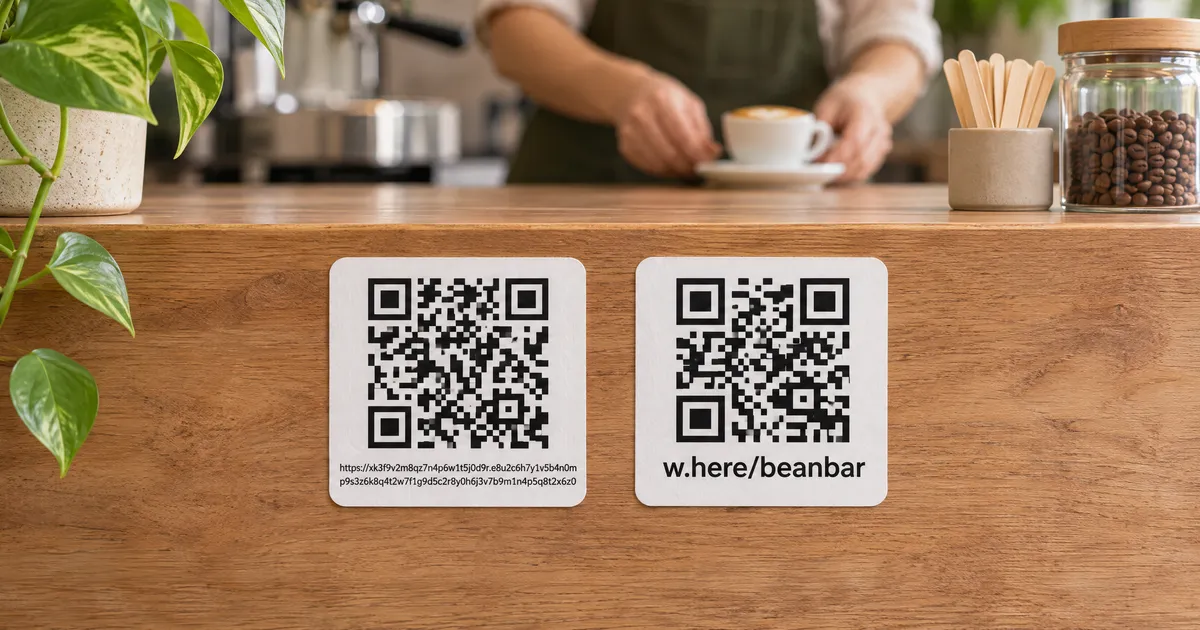
Ask about leaving before joining. If you print a provider's address, exporting the QR image does not transfer control of that address to you. The image still contains the same provider-controlled URL. Before choosing a provider, check who controls the encoded address and who is responsible for keeping its destination available.
Do not choose a service for numbers it cannot measure
Some products report requests to their redirect addresses. Others report page visits or taps on links. Those are different events, and none is automatically a count of unique people who successfully scanned your print.
Someone can type the same address, open it from a message, refresh the page, or visit twice. A customer can reach your booking provider and still leave without booking. Decide which measurement would help you make a real decision before paying for analytics.
If your immediate need is simply to keep a menu current, reliable editing and account ownership may matter more than a busy reporting dashboard. If you need campaign attribution, ask exactly what is recorded and how separate placements are distinguished.
Make the choice before the print order
Use this checklist with the person who will actually maintain the code:
- We know the exact data encoded in the image.
- We know who controls the encoded address and can recover the account.
- We have confirmed how to change content or the redirect destination.
- We understand recurring charges, limits, and cancellation behaviour.
- We have a readable address or another access route beside the code.
- We have scanned a physical proof and completed the intended action.
- We have recorded an owner and a date for the next check.
If the code is already printed, start with the existing address before buying another tool. The guide to changing a QR destination after printing explains the recovery options. For new materials, choose an address you can maintain for their expected lifetime, then test the finished print with the people and phones likely to use it.